The short answer
Since August 2026, claude.ai's usage page shows nothing to Free accounts. The limits still exist, and every reply Claude sends still carries them. To see them, install Claude Monitor (free) and turn on its usage bar: after your next message it shows your 5-hour session and weekly usage, each with its reset time.
What changed for Free accounts
On paid plans, claude.ai/settings/usage lists your 5-hour session and weekly limits with their reset times. Since August 2026 that page is empty for Free accounts, and the data behind it returns nothing for them either. We checked this on a Free account on October 6, 2026. Usage trackers that relied on that page went blank on the Free plan.
The limits themselves did not go away. claude.ai only tells you about them when you are close to running out or have already hit one.
Where the limits still appear
Every reply Claude sends includes your current usage for the two windows that apply to you: the 5-hour session and the 7-day weekly limit, each with its reset time. You never see this on screen, but a browser extension running on claude.ai can read it as the reply arrives.
How to see them with Claude Monitor
- Install Claude Monitor. Add it to Chrome or Firefox. It is free and needs no account.
- Turn on the usage bar. Open the extension's Settings, check Show a usage bar above the chat box, and allow access to claude.ai when the browser asks. The popup's Free plan notice has a Turn on button that does the same.
- Send a message on claude.ai. Any message works. The limits come back with Claude's reply.
- Read your limits. The bar above the chat box shows your session and weekly usage and when each resets. The toolbar badge and popup show the same numbers, and alerts fire at 80% and 95%.
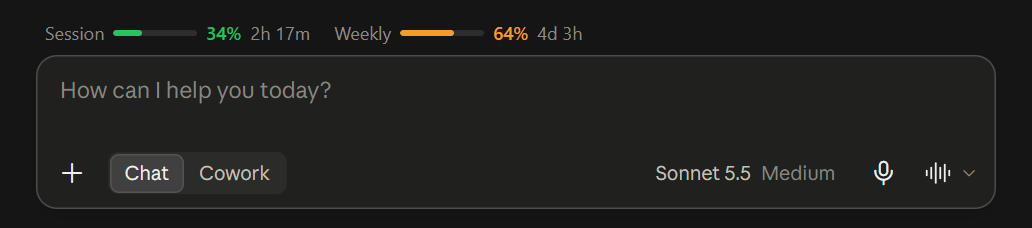
What the bar can and cannot see
The bar is off by default. Turning it on lets the extension run on claude.ai pages, and turning it off gives that access back. It reads only the usage figures attached to each reply: your prompts are never touched, and replies are never kept or sent anywhere. Everything stays in your browser, and the full source is on GitHub. Details in the privacy policy. For how the limits themselves work on every plan, see Claude usage limits explained.
Questions
Why does claude.ai/settings/usage show nothing on the Free plan?
Since August 2026 Claude no longer reports usage to Free accounts on that page or through the data behind it, so it stays empty. Pro, Max, Team and Enterprise accounts still see their limits there.
Does the Claude Free plan have a weekly limit?
Yes. Free accounts have the same two windows as paid plans: a rolling 5-hour session and a 7-day weekly limit, each with its own reset time. The caps are lower than on paid plans.
When does the Free plan limit reset?
The 5-hour session window resets five hours after it starts, and the weekly window has its own reset date. Claude Monitor shows the exact time for both once it has read them from a reply.
Why do my Free plan numbers only update when I send a message?
Because a reply is the only place Claude reports them for Free accounts. Between messages the extension keeps the last reading, and when a window resets it shows 0% until your next message.
Can the extension read my conversations?
No. The bar reads only the usage figures attached to each reply. Your prompts are never touched, replies are never kept or sent anywhere, and the code is open source under the MIT license.