The short answer
It means you have used up your five-hour session limit or a weekly limit. The message names the limit and when it resets: "5-hour limit reached - resets [time]" or "You've reached your weekly limit. It resets [day] at [time]." (Anthropic's help center). You can wait for that time, upgrade your plan, whose limits apply right away, or, on a paid plan, turn on usage credits so your work continues (How do usage and length limits work?).
 Add to Chrome
 Add to Firefox
 Add to Edge
Which limit did you hit?
Most paid plans have a five-hour session limit and a weekly limit; verified Ultra accounts have only the weekly one. Max and Ultra add a separate weekly limit for Fable (Anthropic's help center, What is the Ultra plan?). The message tells you which one ran out. These are the wordings Anthropic documents:
| Limit | What you see | When you can continue |
|---|---|---|
| Warning | "Approaching session limit", "Approaching weekly limit" or "You've used X% of your weekly limit". You are close to a limit but can still send messages (help center). | Now |
| 5-hour session | "5-hour limit reached - resets [time]" (help center) | At the time in the message |
| Weekly | "You've reached your weekly limit. It resets [day] at [time]." On Max and Ultra, Settings > Usage shows whether the full bar is the one for all models or the one for Fable (help center). | At the day and time in the message |
| Usage credits on | "5-hour limit resets [time] - continuing with usage credits" or "Now using credits. Your plan limit resets [day] at [time]". You reached a limit, but credits are paying for your requests and you have not been cut off (help center). | Now, billed to your credits |
| Claude Code | "Usage limit reached · wrapping up". The session limit arrived mid-response and Claude Code finishes the step in progress (help center). | New messages wait for the session reset |
A warning can still be on screen at the moment your usage switches to credits, so it can look like you were cut off when your work continues (Manage usage credits). On a paid plan, Settings > Usage shows how much of each limit you have used and when it resets (Usage limit best practices); step by step in how to check your Claude usage.
Two messages that are not a usage limit
"Your message will exceed the length limit for this chat." This is a length limit: the conversation or the files are too long for one chat, and your usage is not the problem. Start a new conversation, or attach fewer or smaller files (help center).
"Due to unexpected capacity constraints, Claude is unable to respond to your message. Please try again soon." Claude is under high demand across all users. It is not an outage and has nothing to do with your plan's limit; try again in a few minutes. Confirmed incidents appear on status.claude.com (help center).
How long until you can use Claude again
The session limit resets every five hours, on paid plans (help center) and on the Free plan (Get started with Claude). The message gives the exact time. Verified Ultra accounts have no five-hour limit, only the weekly one (What is the Ultra plan?).
On Pro and Max, the weekly limit resets at a fixed time each week that is assigned to your account, and the day and time stay the same regardless of when you start using Claude (Pro, Max). If you run out early in the week, the wait can be days. Every reset, plan by plan, is in when does the Claude usage limit reset.
What you can do right now
- Wait for the reset. The message gives the time. Switching to Claude Desktop or Claude Code does not help: they count toward the same usage limit as claude.ai (help center).
- Use a limit reset, if your account has one. Anthropic's plan articles say: "If you have a limit reset, you can use it to reset your five-hour session limit or weekly usage limits back to full." (Pro, Max)
- Turn on usage credits (Pro, Max and Ultra). In Settings > Usage, enable usage credits, set a monthly spend limit and add funds. Your requests continue at standard API rates, billed apart from your subscription, and your limits still reset on schedule. If you subscribed through the mobile app, enable them on the web (Manage usage credits for paid Claude plans).
- Upgrade. Your new plan's limits apply right away (help center). Max includes five times the Pro plan's usage every five hours and every week (What is the Max plan?). Ultra, the plan that used to be called Max 20x, includes ten times the Pro plan's usage every week, with no five-hour limit for verified accounts (What is the Ultra plan?).
- In Claude Code only: Anthropic also lists switching to a Claude Console account and paying for API usage (Use Claude Code with your Pro, Max, or Ultra plan). With an
ANTHROPIC_API_KEYenvironment variable set, Claude Code bills the API instead of your subscription (same article). More on Claude Code usage limits.
How to make your limit last next time
Anthropic's own tips (Usage limit best practices, How do usage and length limits work?):
- Start a new conversation for a new topic: the length of the current conversation is one of the things that use up your limit.
- Put documents you reuse in a project. Cached project content counts less against your limits.
- Batch related questions into one message instead of several.
- Turn off extended thinking, lower the effort level and turn off tools or connectors when a task doesn't need them.
What counts against each limit is in Claude usage limits explained.
See it coming with Claude Monitor
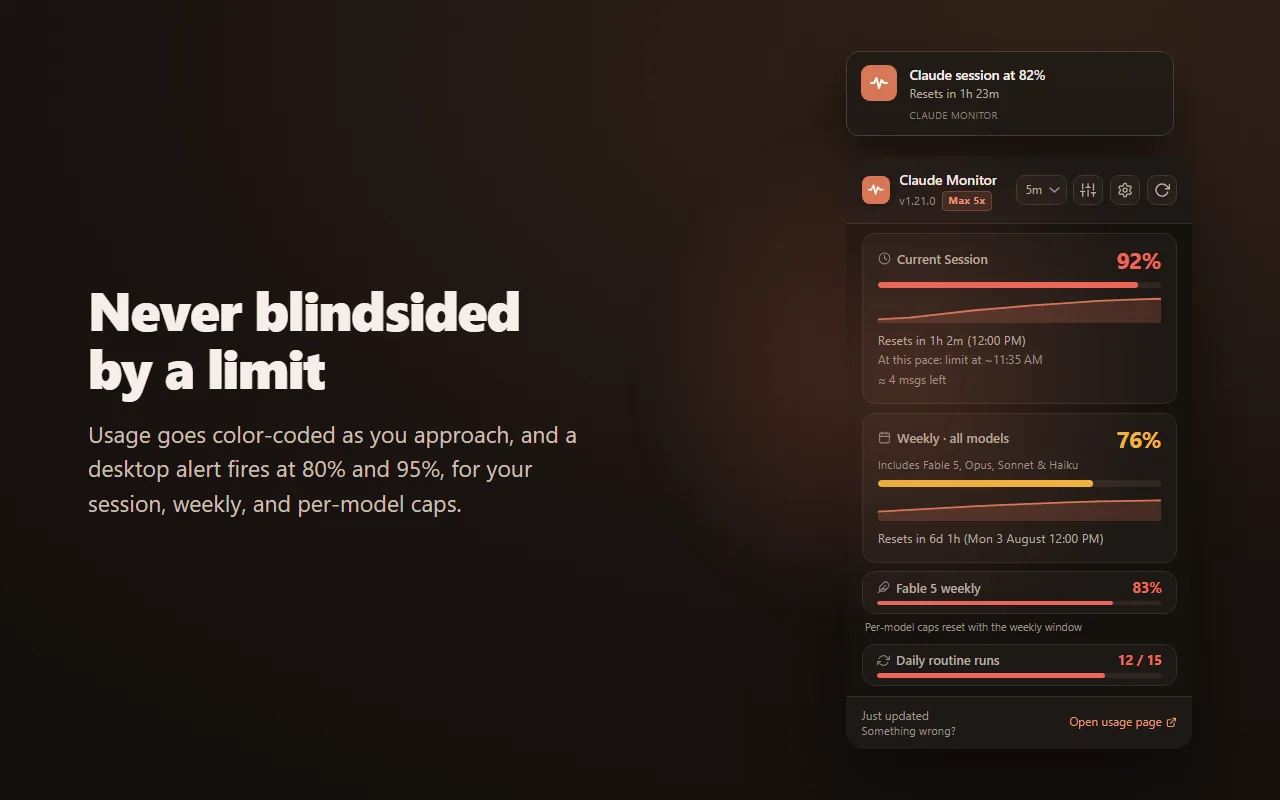
claude.ai warns you when you get close to a limit. Claude Monitor, a free extension for Chrome, Firefox and Edge, keeps the numbers in view all the time: your session percentage on the toolbar icon, desktop alerts at 80% and 95% of your session, weekly and per-model limits, and a countdown to every reset. When your session is filling fast enough to run out before it resets, it estimates roughly when you will hit the limit. When a session that crossed the alert threshold resets, it sends one notification, so you know you can get back to work.
It works on the Free plan too, where claude.ai shows no usage: turn on its usage bar and it reads your limits from each reply. Your usage data stays in your browser: no account, no analytics, no telemetry (privacy policy). Installation steps are in the setup guide.
Questions
Why does Claude say I reached my usage limit?
You have used up your five-hour session limit or one of your weekly limits (Troubleshoot Claude error messages). How fast you get there depends on message length, attached files, the length of the conversation, the model, the effort level and tools such as web search or Research (Usage limit best practices). Your use of claude.ai, Claude Desktop and Claude Code counts toward the same limit (How do usage and length limits work?).
How long do I have to wait after hitting the Claude usage limit?
The message tells you: a time for the session limit, a day and time for the weekly limit (help center). The session limit resets every five hours. On Pro and Max, the weekly limit resets at a fixed time each week assigned to your account (What is the Pro plan?). More in when does the Claude usage limit reset.
Can I keep using Claude after I hit the limit?
On Pro, Max and Ultra, yes, if you turn on usage credits: your requests continue at standard API rates until your monthly spend limit or your prepaid balance runs out (Manage usage credits for paid Claude plans). On any plan you can also upgrade; the new plan's limits apply right away (How do usage and length limits work?). Otherwise, wait for the reset.
Does switching to Claude Code or the desktop app get around the limit?
No. claude.ai, Claude Desktop and Claude Code count toward the same usage limit (How do usage and length limits work?). On Pro, Max and Ultra, Claude Code shares your plan's limits with Claude (Use Claude Code with your Pro, Max, or Ultra plan).
Is "capacity constraints" the same as a usage limit?
No. "Due to unexpected capacity constraints, Claude is unable to respond to your message" means high demand across all users, not your own limit. Anthropic's help center says to try again in a few minutes (Troubleshoot Claude error messages).
Does the Claude Free plan have a usage limit?
Yes. The Free plan has a session-based usage limit that resets every five hours, and the number of messages varies with demand (Get started with Claude). claude.ai does not show Free accounts how close they are: when we checked a Free account on October 6, 2026, Settings > Usage showed no usage. Claude Monitor reads the limits from each reply once its usage bar is on; see Claude usage on the Free plan.