The short answer
On a paid plan, open claude.ai and go to Settings > Usage (or straight to claude.ai/settings/usage): it shows your 5-hour session, your weekly limit and any per-model weekly cap, each with its reset time (Anthropic's help center). In Claude Code, run /usage. On the Free plan the usage page showed nothing when we checked on October 6, 2026. As of October 2026, each reply still carries your limits, which a browser extension can read.
What each method shows
| Where | What it shows | Plans | Always in view? |
|---|---|---|---|
| claude.ai Settings > Usage | Session, weekly and per-model limits with reset times, and usage credits. On the layout we checked, also a pace forecast and the week's usage by product. | Pro, Max, Team, seat-based Enterprise | No, you open the page |
| Claude desktop app | The same Settings > Usage page as on the web | Paid plans | No, you open the page |
Claude Code /usage | Plan usage bars, a usage-credits row while credits are on, and a breakdown of what used your limit (from this machine only) | Pro, Max, Team, Enterprise, signed in with your subscription | No, you run the command |
| VS Code: Account & usage | Session and weekly bars with the time to each reset, plus the same breakdown with a Day and Week toggle | Pro, Max, Team, Enterprise, signed in with your subscription | No, you open the dialog |
| Free plan | Nothing on the usage page (checked October 6, 2026); Claude notifies you when you reach a limit | Free | No |
| Claude Monitor (ours) | Session, weekly, per-model caps, usage credits and routine runs, with a countdown to every reset, alerts at 80% and 95%, and 30 days of history | All plans; Free once its optional bar is on | Yes: a toolbar badge and an optional bar above the chat box |
Usage in claude.ai, the desktop app and Claude Code counts toward the same limits (Anthropic's help center), so every one of these places is showing you the same pool.
1. On claude.ai: Settings > Usage
- Open claude.ai and click your name in the bottom-left corner.
- Choose Settings, then Usage. You can also go straight to
claude.ai/settings/usage. - Read the bars at the top: Current session is your 5-hour window, This week is the weekly limit shared by all models, and a model with its own weekly cap gets a bar of its own. Each one shows how much you have used and when it resets.
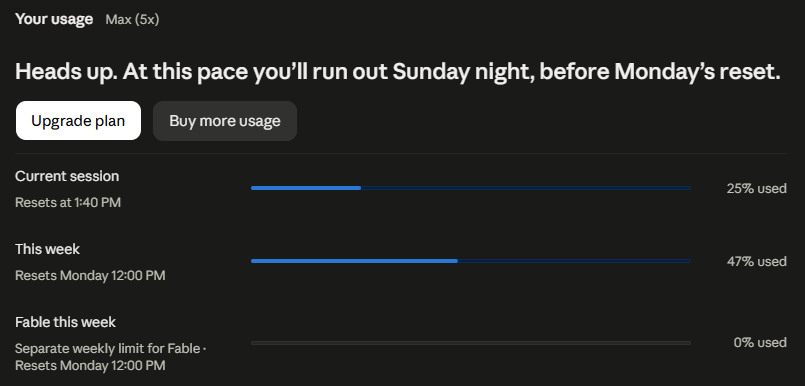
Further down, the same page shows your usage credits: the balance, and the monthly spend limit if you set one. On the layout we checked it also forecast when the account would run out at its current pace, and split the week's usage by product (Claude Code, chats and Cowork).
Anthropic lists this page for Pro, Max, Team and seat-based Enterprise plans (Usage limit best practices). Its catch: it only tells you where you stand when you open it. For when each limit resets, see when the Claude usage limit resets.
2. In the Claude desktop app
The desktop app for Windows and macOS shows the same account settings as the website: click your name in the bottom-left corner, choose Settings, then Usage. It is the same page, for the same account; we checked it on Windows on October 15, 2026. Anthropic counts Claude Desktop toward the same usage limit as claude.ai and Claude Code (help center).
3. In Claude Code: the /usage command
- Start a Claude Code session signed in with your Claude subscription (Pro, Max, Team or Enterprise).
- Type
/usageand press Enter. - Read your plan usage bars. The same screen shows a usage-credits row while usage credits are on, and a breakdown of what used your limit recently: skills, subagents, plugins and MCP servers, with a toggle between the last 24 hours and the last 7 days.
The breakdown is approximate and built from the Claude Code sessions on that machine, so it leaves out claude.ai and your other devices. The plan bars come from your account; when that request fails (usually because the usage endpoint is rate limited), /usage shows the bars it last loaded on that machine within the past 60 minutes, marked as last-known usage, and r retries. With an API key or a cloud provider there are no subscription limits. The Session block at the top of /usage then shows an estimate of the session's API cost. Details in Anthropic's Claude Code docs; for how the limits apply to coding, see Claude Code usage limits.
4. In VS Code: the Account & usage dialog
- In the Claude Code extension for VS Code, type
/usagein the prompt box. - The Account & usage dialog opens with your signed-in account and usage bars for your plan's limits, such as the current session and the week. Each bar shows how long until it resets.
- Below the bars, the Day and Week toggle switches the breakdown of what used your limit.
As in the terminal, the breakdown only counts sessions on that machine. The extension needs a paid Claude plan or a Claude Console account (VS Code docs).
5. On the Free plan: why you see nothing
When we checked with a Free account on October 6, 2026, claude.ai's usage page showed no usage figures, and the data behind it returned nothing for Free accounts. The limits did not go away: Anthropic's help center documents a session limit on the Free plan that resets every five hours, and the reply data we read also carries a weekly window with its own reset time. The same article says Claude notifies you when you reach your limit. Claude Code needs a paid plan or an API key (Anthropic's help center), so on the Free plan /usage is not an option either.
What is left is each reply: Claude sends your current usage back with every response, and a browser extension running on claude.ai can read it. The Free plan guide has the steps.
6. With a browser extension: Claude Monitor
This is our extension, so weigh this part with that in mind. Claude Monitor is free and open source, for Chrome, Firefox and Edge.
- Add it to Chrome, Firefox or Edge and stay signed in to claude.ai.
- Look at the toolbar badge for your usage at a glance, and click it for the full breakdown: session, weekly, per-model caps, usage credits and Claude Code routine runs, each with a countdown to its reset.
- Optional: turn on the usage bar in Settings to see the same numbers right above the claude.ai chat box. With the bar on, it scans each reply only for the usage figures attached to it, which is how Free limits appear.
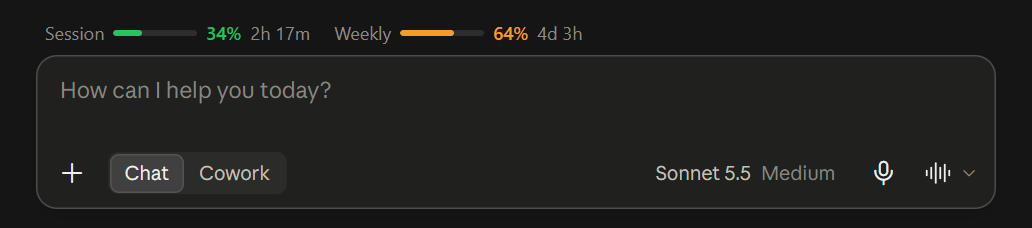
It also sends a desktop alert when a limit crosses 80% and 95%, and keeps 30 days of history you can export. Your usage data stays in your browser: no account, no analytics, no telemetry. It never stores or sends your prompts, replies, projects or files. It does not count tokens per conversation. For the questions to ask of any Claude usage tracker, and how Claude Monitor answers them, see choosing a Claude usage tracker.
 Add to Chrome
 Add to Firefox
 Add to Edge
On the Free plan we have tested the bar with claude.ai's classic layout; we have not yet confirmed it on Free with the newer layout we saw on claude.ai in October 2026.
How we checked
We looked at claude.ai's usage page on a Max plan on October 15, 2026, and on a Free account on October 6, 2026. The Claude Code and VS Code steps come from Anthropic's documentation (costs, VS Code), read on October 15 and October 18, 2026, and that usage is shared across products comes from Anthropic's help center. Menus and labels change; if something here is out of date, open an issue and we will fix it.
Questions
How do I check my Claude usage?
On a paid plan, open claude.ai, click your name in the bottom-left corner and choose Settings, then Usage, or go straight to claude.ai/settings/usage. It shows your 5-hour session, your weekly limit and any per-model weekly cap, each with its reset time. In Claude Code, run /usage.
Why does my Claude usage page show nothing?
Most likely you are on the Free plan. When we checked with a Free account on October 6, 2026, claude.ai's usage page showed no usage figures. Free accounts still have the session limit Anthropic documents, which resets every five hours, and the reply data we read also carries a weekly window. Each reply still carries your current usage, which a browser extension can read.
How do I check my usage in Claude Code?
Run /usage in a session signed in with your Claude subscription. Subscribers see their plan usage bars on that screen, together with a breakdown of what used the limit. In the VS Code extension, /usage opens the Account & usage dialog. With an API key there are no plan limits, and the Session block at the top of /usage shows an estimated API cost instead.
Does Claude Code count against my claude.ai limits?
Yes. Anthropic says usage across claude.ai, Claude Code and Claude Desktop counts towards the same usage limit, so the usage page on claude.ai includes what you spend in Claude Code.
Can I see my Claude usage without opening the settings page?
Not in claude.ai itself: the usage page only shows where you stand when you open it, and otherwise claude.ai warns you as you approach a limit and tells you when you reach it (Anthropic's help center). A browser extension such as Claude Monitor keeps the numbers in your toolbar, can show them above the chat box, and sends a desktop alert at 80% and 95%.
Why does Claude show percentages instead of messages left?
Because a message does not have a fixed cost: it depends on its length, its attachments, the conversation so far and the model. Anthropic does not publish message counts per plan, so the usage page shows how much of each limit you have used.